I'm no stranger to using ChatGPT for development — a good chunk of the migration of all my apps from Objective-C to Swift, over a hundred thousand lines of code, was done with LLM assistance — but I've been sleeping on the shift that is already well underway in our industry.
A year ago ChatGPT added an 'agents' feature that I handed some programming tasks, like putting together a shell of an Android app that could someday become Broadcasts for Android. The results were interesting, but not really worth pursuing at the time. A lot has happened since then, and tools like Claude Code have started taking over the development processes inside many corporations. I was dimly aware of this, but it wasn't until Xcode 26.3 was revealed, with Claude and Codex integration, that I gave it a shot myself. Honestly, I don't think I knew that Codex was worth checking out until this put it on my radar, around the same time they launched the Codex desktop app.
I spent one month battle-testing Codex 5.3, the latest model from OpenAI, since I was already paying for the $20 ChatGPT Plus plan and already had access to it at no additional cost, with task after task. It didn't just blow away my expectations, it showed me the world has changed: we've just undergone a permanent, irreversible abstraction level shift. I think it will be nigh-impossible to convince somebody who grows up with this stuff that they should ever drop down and write code the old way, like we do, akin to trying to convince the average Swift developer to use assembly language.
All of these experiments below were posted to Mastodon, but there's just so much to talk about that I decided I should summarize it here for the wider world.
TL;DR, this is what I'm going to go through in this post:
- Prototyping multiplatform UIKit apps in Xcode 26.3
- Debugging complex problems in a large codebase
- Converting an entire project in one shot from Objective-C to Swift
- Porting a Swift-based iOS project to Android first as an experiment, then performing a full-on product-quality port of one of my apps
- Migrating a Unity3D game jame game to Swift and SpriteKit
- Generating complex sample documents in an automated way in the Coppice document format
- Beginning work on a full-fat port of one of my big apps to WinUI via the Windows App SDK, while using advanced Win32 features
- Porting Windows Phone 7 apps to a production-ready standard as Windows 11 desktop apps.
I did all of this at the same time as, without AI, reworking, redesigning and shipping Coppice for macOS 26 and the App Store, a 70,000-line app whose codebase was unfamiliar to me.
Outset
I had a couple of questions that I wanted to answer for myself:
- What can I do with this?
- How much is it going to cost me?
This might be a long post, so strap in…
P.S. This post was not written with AI. I use em-dashes liberally. You should too!
Week 1: Prototyping with Xcode 26.3
I was very cautious about trusting Codex with my codebases at first, even in Xcode's sandbox that sees it de-clawed a bit, so I started prototyping some apps from scratch. I needed to see if it could follow my coding style: UIKit, no SwiftUI, no autolayout, no NIBs, with Mac Catalyst support from the outset. To achieve this, I wrote up a 'CodingStyle.md' Markdown file with just a few bulletpoints, with which I could seed future interactions. As I bump into programming choices it makes that I don't agree with, I add them to the style file to try to make sure it does it my preferred way next time. I also have a pre-made minimal Xcode project template that I use for everything I build, so that everything works out of the box and I have my project settings of choice, like warnings-as-errors, on. These two things are the starting point for my initial interactions with Codex.
I took a random project from my long todo list, a 'timeline' app, and progressed it for an hour or two, making sure it had a working data model, could save to disk, and could print or save to PDF. I got exactly what I had envisioned in my head, complete with custom layout containers and controls, and drag-select, when I asked for them. Mac and iPad out of the box. Days, weeks of code in an instant. It dawned on me that an app like this alone, even in this state, could be some up-and-coming indie developer's magnum opus, their first app for the App Store.

I inspected the code and found everything written and structured pretty much as I would have written it. Not hacks upon hacks, not unmaintainable slop, just decently-written 'code'. As average as my own.
How much of my budget did this cost? 7% of my usage limit. An entire app, but a small fraction of my monthly quota.

OK, so Codex can build something that looks like a Mac app using standard UI elements. What about something with nonstandard UI, floating palettes, and a zoomable canvas?
I thought a pixel drawing app could showcase that best.
I coached it into building floating palettes using UIGlassEffect, and into figuring out some complex scroll view code to allow panning and zooming while centering content in the safe area between the two palettes, with overscroll — something I know would have been a nightmare to figure out myself. I ended up with a little layered painting app that can read/write files on disk. I even had it add in some shape-filling tools. If I had spent more time on this, I would have started to polish the UI a bit more — it's pretty barebones as-is — but I was far more interested in the mechanical complexity of this experiment.

Objective-C -> Swift -> Android (SameGame)
I was starting to get more confident in Codex's abilities, and wanted to try it at a more-difficult task. It was at this time that I moved from Xcode 26.3 into the Codex app, just so I could let it do more-drastic things with a project's folder structure.
(Little did I know at this point that I would effectively never go back to using Codex in Xcode itself)
I checked out a ten-year old revision of my SameGame app, written in Objective-C. I had to reach back this far into the repo precisely because I had already rewritten this app in Swift at a later stage, and modernized a lot more of the UI. This classic version had legacy audio APIs, defunct Flurry analytics, and a bunch of cruft built up from its years of progressing from the original iPhone to larger devices, iPad and Mac, and I wanted to see how Codex would handle migrating it to Swift and modern APIs compared to my own.
It performed the migration in one shot. Not a line of ObjC remained, and the app built and ran first time. The audio worked, the gameplay worked, and the custom animated settings screen was intact.
So far, so boring.
What I really wanted to have it try was to port this classic SameGame app to Android, a task that ChatGPT's agent feature had failed at a year ago. So I asked it to port it to Java/XML, gradle and Android Studio, all of which I was familiar with. It asked some big-picture questions, I gave it guidance, and off it went.
I spent two sessions prompting my way through the porting process. I only wish I had taken screenshots of the early builds, as I don't for a second want to give the impression that it did it perfectly all in one go. The game ran, it had some of the right assets, but the buttons didn't work, the logic didn't work, the menus didn't work — but I expected that. At every step, I had it re-reference the iOS codebase, and just refined everything piece by piece. Very soon I had a complete, 1:1 port of this game running on Android. And, to my surprise, it was fully-backwards-compatible all the way to Android 5.0, from well over a decade ago.
This Android version was created from the Swift version that was created from the Objective-C codebase. Two levels removed from the last human-written code. 😯

It was at this point that the reality of what had transpired started to set in. I had to ruminate on this for a while, because I had some big plans for new avenues that were now open to me.
I had intended this to be a throwaway experiment. But now I was looking at a fully-functional version of SameGame on my Pixel 9 Pro, with sound, animation, multiple language support, and more. I figured: this deserves a chance to live.
So I decided that to truly understand the zeitgeist, I needed to ship this to Google Play. It is a zero-risk project; I don't need it to make money, I don't collect tracking data or do advertising. It wasn't 'vibecoded', it was methodically recreated using the iOS source code as a basis. The classic codebase, not on par with the latest version, but a game nonetheless. A harmless experiment.
And so I did.
This would be only the first of several 'production-quality' apps I shipped this month, in my spare time.
Unity3D -> SpriteKit
Twelve years ago, I entered a little project into Ludum Dare's MiniLD50. It was a top-down 2D demake of Quake 3 Arena's capture the flag mode, with crummy developer pixel art. It had bots and AI behavior, network play, and was the gamiest game I ever developed.
But I had long since fallen out of love with Unity, and haven't actually seen this running in over a decade (since the Ouya console, of all things).
Many times over the years I had attempted to resurrect this game, with C and SDL, with Swift, with Godot, and just run out of steam before getting anywhere.
Could Codex figure this out for me? Could a simple 2D Unity project be ported to SpriteKit? Would it even know what to do with all of Unity's various formats and tilemaps and APIs?
The answer: a resounding yes.
It had something I could run in one shot, which was most impressive. Not complete, but upon my first load I was greeted with a functional map with AI bots running around shooting at each other. I spent a night prompting my way through the rest of the bringup process, improving the viewport, making sure the menus and HUD looked right, adding gamepad input and solving a hundred little issues with it.
It just got so much right, and it was trivial to fix the rest; it was a joy merely to play the game again, even if it is to go back on my shelf for now. I posted a notarized build so people could check it out, and I moved on, buoyed by yet another success.

Lights Off for Android
My Codex weekly quota had reset, I had a fresh slate, and it was time for week 2.
I had run out of throwaway experiments to do at this point. I had started pointing Codex at other existing prototypes on my shelf and making little bits of progress on all of them just to close out week 1, but now I wanted to build something for real with the intention of shipping from the get-go.
This time, it would be a port of Lights Off to Android, using the modern, up-to-date iOS codebase. Another low-risk project, I wanted it to use the latest Material Design and do the platform justice.
Lights Off previously had an Android port, back when Android ran on but a handful of devices like the ADP1, written by myself in Java/XML. It was perfunctory, never had any commercial success, and was far more trouble than it was worth to update it for newer devices and screen sizes, so it was left abandoned until Google pulled the plug in a mass-culling of outdated apps in 2016 or so.
I wanted to do better, and with Codex I knew I could.
For the first time, I preserved and shared my side of the entire prompt history, so that others could follow how I was doing this. Only my side, of course, because Codex's answers were full of long bodies of text and snippets of code, but you can get the gist of what's happening. I didn't, sadly, take screenshots of the early part of this process, and waited until I had it in a fully-functional state.
The iOS version was the source of truth, once again. I asked for parity, piece by piece, and would hand screenshots back to Codex whenever words weren't doing it justice. It in particular had to be guided through the process of using Material Design Expressive styles and controls, and I had very little by way of example apps to compare to, as every one of Google's own apps seems to have a different design language. I made sure my layouts switched appropriately between bottom tab bars and navigation rails on larger devices like foldables, and that my colors picked up the user's adaptive Material You personalization settings.
That even inspired me to add a 'Dynamic' game theme that draws its color palette from the user's wallpaper and system theme, which I think produces some genuinely beautiful results. My Rose Quartz Pixel has a pink wallpaper and thus gets a pleasant pink-and-plum-color theme throughout Lights Off.
Over two sessions, an evening and a morning, I had a version of Lights Off using Material Design that I am very proud of. And once again, like every other example here, I did not write a line of code myself. Ready to ship.
You can get it on Google Play today.


Week 2 Prototypes
I was still pointing Codex at various projects and experiments throughout my downtime, bringing things from visual mockups to complete, functioning apps every session. A soundboard app, a storyboarding app, a 'sticky notes' app, and more.

One fun prototype involved a piano keyboard and a PencilKit drawing surface that let you record onto a music sheet, with so many interconnected parts that would have taken me weeks to figure out if I were to build it by hand.
Coppice
All this time, I was working hard on Coppice. A hyperlinked mind-mapping app, originally developed by Martin Pilkington and entrusted to me before he sadly lost his battle with cancer last year, I had been hoping to get it back into a working state, port it to macOS 26 and Liquid Glass, and bring it to the App Store in time for the one-year anniversary of his passing. There is a much longer story here, for another time.
Coppice was the 'day job', while Codex was for moonlighting.
Coppice is a meticulously hand-crafted 72,000 line of code codebase, and that's how I kept it — no AI-written code here. However, I did have some truly gnarly bugs to figure out deep in data model code, and TextKit layout code, that honestly could have stumped me for quite a while — those are critical, complex, hard-to-debug pieces of infrastructure in the app that I didn't want to touch if I could help it. Codex understood the codebase well enough in seconds that it was able to point me directly to the problem areas, and served as rubber duck as I patched my way through them (by hand), which involved migrating the app from TextKit 1 to TextKit 2 and redoing a whole bunch of logic. I had been working on the app for weeks, and even I didn't have enough of that context in my head to zero in on the right places on my own.
I made it over the finish line before the self-imposed deadline, in a big way thanks to Codex.
After Coppice shipped, I started to wonder how Codex would fare if handed a sample Coppice document, a format it had never seen before, with no docs, no code, no specs. Coppice documents are macOS-style bundles with files and plists, and I wanted to see if I could use Codex to automate sample document generation.
Its first attempt, which it one-shot, is a bit more like the evidence board meme than a real Coppice document, but rapidly I taught it to refine its technique and it started pumping out documents on various topics of its choosing, with formatted text and color and images and working links and branches. Documents testing links and other features, stress-testing the layout engine, and more, all to provide me with usable sample and debug content.


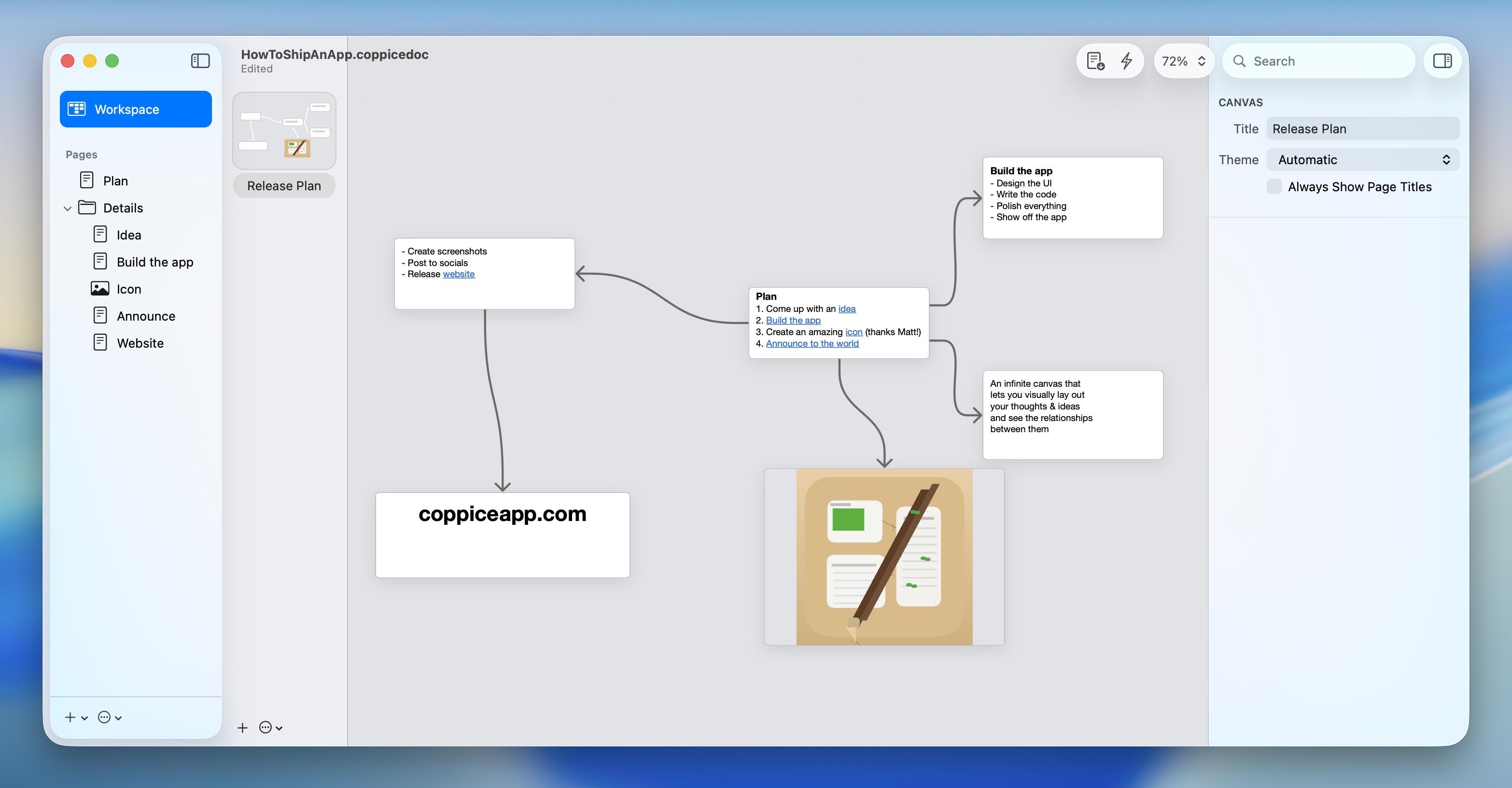
Once it seemed familiar with the format, I tried something fun: I had a screenshot of a Coppice document in an older version of the app, and I handed it to Codex and told it to reconstruct it.
Once again, it blew me away by doing exactly what I asked it to.
All the pages had the right names, the project structure was intact, the rich text had the right links, the layout was mostly in the right arrangement, and it even drew a picture of its own to insert in place of the one shown in the screenshot.
Just another massively-helpful thing it can 'just do', which at this point was already a long list.
I had it write up a Coppice document portability spec for me with everything it knew, so that I can provide as context to future models, and moved on.

Week 3: Pastel for Windows
Another weekly reset, and an opportunity to try the biggest project yet. I had, some years ago, built a functional mockup of my Pastel app in Windows' UWP SDK, using C# and XAML. I was no stranger to Visual Studio — all my apps had once been ported to Windows Phone, many moons ago, and I had gone through the torturous migration process bringing them to Windows Phone 8, then Windows 8, then Windows 10 Mobile's version of UWP. Windows 11's Fluent design language, and macOS 11, were incredibly similar, and I always figured Pastel would make for a nice-looking Windows app in this style.
UWP though, has long since been deprecated, and Microsoft has a new (and hopefully final) app SDK for building modern apps, combining the best of UWP and Win32 in one hybrid solution, the Windows App SDK.
Let's set aside for a while the fact that 'nobody writes native Windows apps anymore'. When high-quality ports are this trivial, all bets are off.
I had already ported my UWP prototype of Pastel to WASDK, so I had a VS project that could build and run and mostly looked like what I wanted — just without the code-behind to make the app an app. This was my starting point for Codex.
Codex doesn't run natively on Windows as of the time of writing, so I was using the commandline Linux version of Codex in Windows' Linux subsystem. This, of course, proved no hindrance to it.
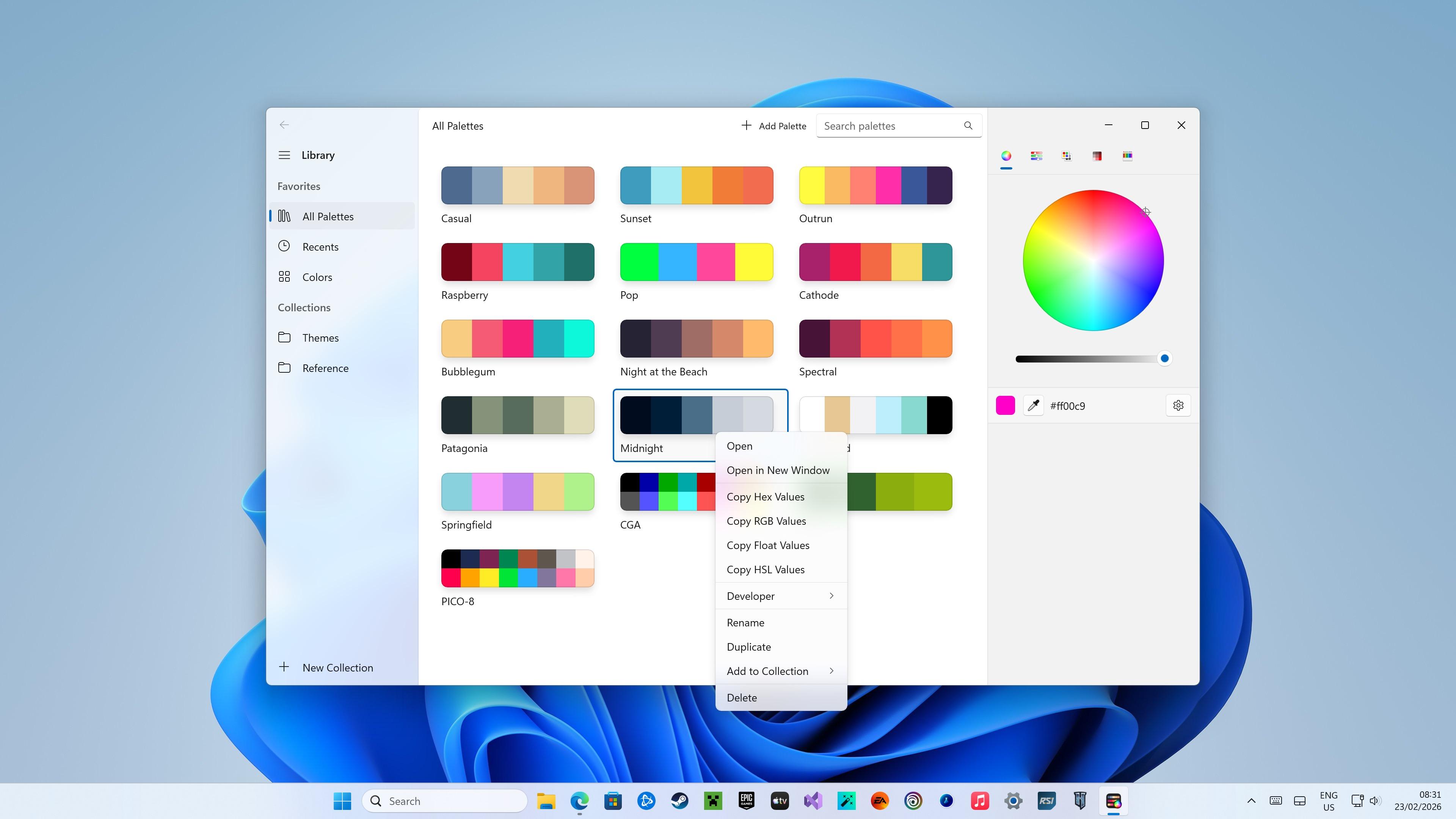
Pastel is a 70K line of code iOS app. I provided Codex access to a copy of the source code, and once again, set it upon recreating the app piece by piece. For this initial version of the app, I focused on just the core functionality: navigation, data model, context menus, and editing.
The Windows version of Pastel is currently unfinished, but I made a ton of progress. It's currently sitting at about 10K lines of code, but has hit all of the goals I wanted to hit with this attempt. It has a ton of custom UI and drops down to Win32 to perform all kinds of things that needed deeper integration, like its screen color sampling feature. It supports drag and drop from the color swatch in the inspector to palettes, multiple windows, dark mode and more.
I even released a test version for you to try out on the Windows Store. This build is only accessible via direct link (you can't find it on the Store otherwise), and does not save the datastore to disk. There's a lot more to do, and a lot more to come, but for now this is where Pastel for Windows sits.

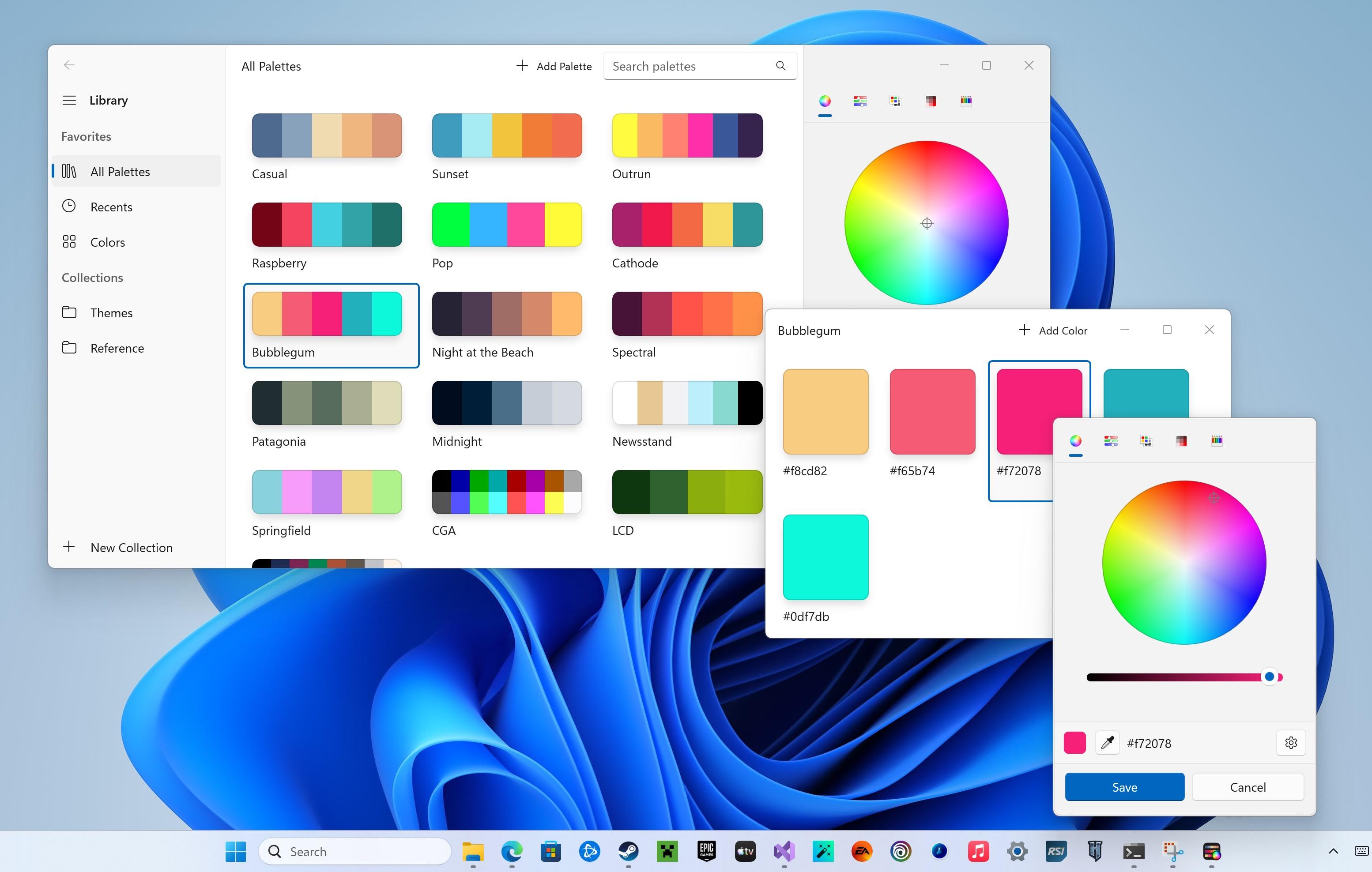

As a bonus, WASDK can also deploy back to Windows 10, so I ended up making sure Pastel could run OK on that platform too. I don't know yet if some unforeseen issue might arise that would make the Windows 10 version nonviable, but right now it's fully-functional.

Week 3: Lights Off and SameGame, Windows Phone -> Windows 11
As a final act, I wanted to give Codex a chance to port my existing Windows Phone apps to Windows 11, starting with Lights Off.
Now I had both an iOS and an Android codebase for Lights Off, two sources of truth, it made triangulating a Windows version that much easier. In fact, the Windows port leaned on the Android version quite a bit this time as its preferred reference.
This time, I took screenshots of the ugly phases of this port, so you have a better understanding of what those intermediate steps actually look like, in between the 'polished' pictures I'm showing here.
Once again, it took one evening and a morning of prompting and debugging to complete to a quality level I'm happy with, and I've already started the publishing process on the Microsoft Store. Another shipping app I'm proud of.

I began the same process with the Windows Phone version of SameGame, and here you can see the initial bringup, but I haven't yet gone on to progress it to the same quality level as Lights Off.

What did it cost?
I used Codex daily for three weeks, on the $20 ChatGPT Plus plan (I was already paying for this). Not once did I hit the 5-hour usage limit, nor the weekly limit.
There's a catch: for this launch period, OpenAI has been providing 2X the regular usage limits for Codex. Without this temporary increase, I would have hit the limit every week, and would have had to buy extra credits in $40 increments or bump up to the $200/mo plan, neither of which I had any intention of doing.
The fear of accidentally blowing my budget is why I've avoided Anthropic's Claude, and projects like OpenClaw. It was easy to experiment with Codex because it was a 'free' addon under my existing subscription, and honestly the results can speak for themselves.
This temporary bonus will be taken away April 2nd, and I honestly have no idea how its going to crimp my usage of Codex. It doesn't feel great to have my wings clipped before I've reached the sun. The first taste is free…

Conclusion
This story is unfinished; this feels like a first foray into what software development will look like for the rest of my life. Transitioning from the instrument player to the conductor of the orchestra. I can acknowledge that this is both incredibly exciting, and deeply terrifying.
I have perused the source code of some of these projects, especially during the first few days. But very quickly I learned there's simply nothing gained from that. Code is trivial, implementations are ephemeral, and something like Codex can chew through and rewrite a thousand lines of code in a second. Eventually, I just trusted it. Granted, I almost always had a handwritten source of truth, as detailed a spec as any, so it had patterns and structure to follow.
The models are good now. A year ago, none of them could do any of this, certainly not to this quality level. But they don't do it alone. A ton of work went into everything here, just a different kind of work to before. Above all, what mattered most in all of the above examples was taste. My taste, the human touch. I fear for the companies, oblivious to this, that trade their priceless human resources for OpenClaw nodes in a box.
I keep thinking about this:
- I could not have done this without the AI
- The AI could not have done this without me